Why Is My Diode Laser Machine Not Cooling Properly?

Time:2026-10-16 Author:Madeline
0%

When operators ask, “why is my diode laser machine not cooling properly,” the answer usually begins with heat transfer, not software. A diode laser converts only part of its electrical input into light. The remaining energy becomes heat inside the diode, driver, and optical head. RP Photonics identifies temperature control as a central factor in semiconductor-laser wavelength, efficiency, and lifetime. Small thermal changes matter.

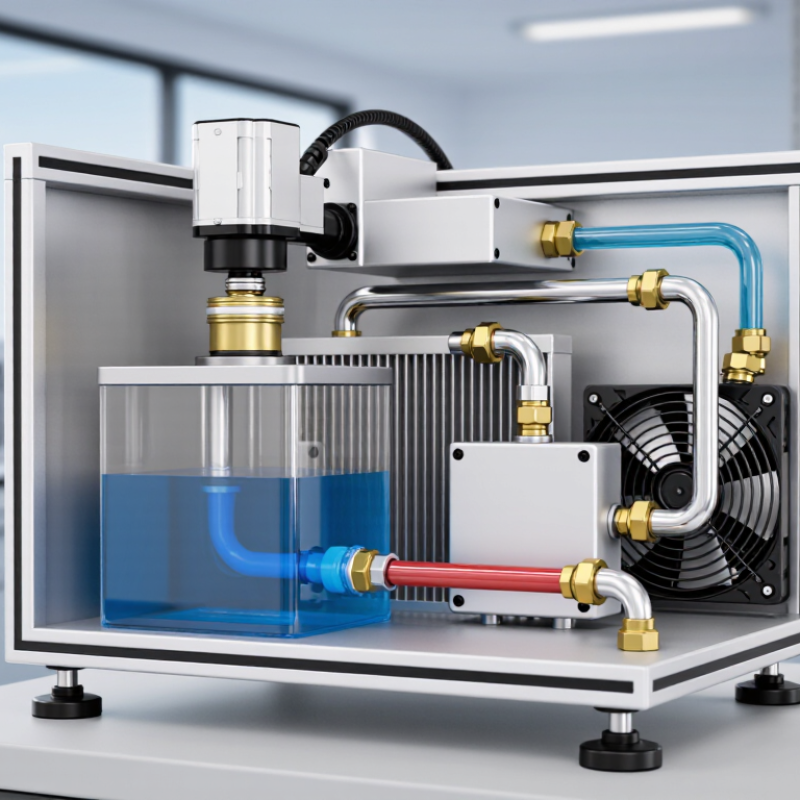
The U.S. Department of Energy’s solid-state lighting research also shows why efficiency and thermal design cannot be separated. Less useful electrical energy becomes heat when conversion efficiency falls. In a working machine, that heat must move through thermal paste, a cold plate, coolant, tubing, and a radiator. One restricted filter can interrupt the entire path. The reservoir may look full. The laser can still overheat.

Dr. Larry A. Coldren, a leading semiconductor-laser researcher, has emphasized this engineering principle: “Temperature control is central to reliable laser operation.” That statement deserves practical attention, especially when output power drops after several minutes. Check the coolant level, pump sound, inlet and outlet temperatures, fan airflow, and filter condition. Touch is not a measurement.

A blocked radiator often feels only slightly warm. The laser head may feel hot. That contrast is a useful clue. Still, I should be cautious: coolant temperature alone cannot prove the fault. Sensor calibration, ambient temperature, electrical load, and mounting pressure may also be involved. Reliable diagnosis requires recorded measurements, manufacturer specifications, and qualified service procedures. Never bypass an alarm or continue firing during abnormal heating.
Why Is My Diode Laser Machine Not Cooling Properly?

Common Causes of Poor Cooling in Diode Laser Machines

Why Is My Diode Laser Machine Not Cooling Properly?

Common Causes of Poor Cooling in Diode Laser Machines

Poor cooling usually begins with restricted airflow or contaminated coolant. Dust on the condenser fins acts like a blanket, while a clogged filter reduces heat exchange. The U.S. Department of Energy reports that dirty heat-transfer surfaces can significantly increase cooling energy use in industrial equipment. In practice, check the air inlet with a flashlight. A warm exhaust stream and a rising room temperature often indicate poor ventilation.

Coolant problems are equally common. Low fluid levels, trapped air, blocked tubing, or an incorrect mixture can reduce circulation. ASHRAE’s Handbook identifies fouling, inadequate flow, and improper fluid conditions as major causes of heat-transfer loss. Keep the reservoir within the maker’s specified range, but do not guess the coolant type. A transparent tube should show steady movement, not bubbles or pulsing. Small leaks can leave white residue near fittings.

Ambient conditions also matter. ASHRAE guidance commonly uses 24°C as a comfortable reference for conditioned spaces, but laser equipment may require tighter limits. Measure the room, outlet air, coolant temperature, and flow rate separately. Do not rely only on the machine’s alarm. I have seen operators replace pumps when a blocked condenser caused the real failure. That mistake is expensive, and surprisingly easy to repeat. Allow the unit to cool before inspection, and record readings during a normal work cycle.

How to Check Coolant Levels and Circulation

Why Is My Diode Laser Machine Not Cooling Properly?

When a diode laser machine overheats, coolant level and circulation deserve inspection before deeper repairs. Switch off the system, unplug it, and let the coolant cool before opening the reservoir. Follow the service manual because reservoir designs and safe fill marks vary. Check the level through the sight window or tank markings. The fluid should sit between the indicated minimum and maximum lines. Do not fill to the rim. Low coolant can introduce air, while overfilling may cause leakage during operation.

Inspect coolant color, clarity, and visible particles under a bright work light. Cloudiness, sludge, or an unusual odor may indicate contamination or degradation. Use only the specified coolant type and mixture. Plain water can encourage corrosion or biological growth. After closing the reservoir, observe the return line while the pump runs. A steady stream suggests circulation, but weak flow needs closer checking. Look for bubbles, pulsing movement, kinked hoses, blocked filters, or damp connections.

A silent pump is not always a failed pump. Air can make it sound normal while cooling remains poor. In my maintenance checks, small bubbles often appeared after coolant replacement. Bleeding the circuit according to the manual restored flow more than once. I should have checked the filter earlier. Record coolant level, temperature, and circulation observations after each service visit. If temperature rises quickly or flow stops, stop using the laser and contact a qualified technician. Never bypass a flow alarm.

Why Is My Diode Laser Machine Not Cooling Properly? - How to Check Coolant Levels and Circulation

No. Inspection Dimension How to Check Normal Condition Warning Signs Recommended Action Status Guide
1 Coolant Reservoir Level Switch off and unplug the machine. Check the reservoir through the sight window or remove the access cover according to the service instructions. The coolant level is between the marked minimum and maximum lines when the system is cool. The level is below the minimum line, fluctuates sharply, or the reservoir appears nearly empty. Use only the coolant specified in the equipment manual. Do not overfill, and investigate possible leaks before continued operation. Normal: Within marks
2 Coolant Type and Quality Review the maintenance record and inspect the coolant for cloudiness, discoloration, particles, oil, or biological growth. Clean, clear coolant that matches the machine manufacturer’s specification. Dirty, cloudy, contaminated, or incompatible coolant may restrict flow and reduce heat transfer. Drain, flush, and refill the system only with the approved coolant. Never mix different coolant types unless explicitly permitted. Warning: Contamination
3 Coolant Temperature Read the built-in temperature display or measure the reservoir temperature with a suitable thermometer after the machine has operated under normal load. The temperature remains within the operating range specified by the machine manual and stays stable during treatment. The temperature rises continuously, reaches the alarm threshold, or is much higher than the room temperature. Stop treatment if the temperature alarm activates. Allow the system to cool and check airflow, coolant level, pump operation, and radiator cleanliness. Warning: Rising temperature
4 Coolant Circulation Observe the flow indicator, return line, or reservoir movement after powering on the cooling system. Listen for the pump starting. Visible, steady circulation with no repeated flow alarm, excessive vibration, or unusual pump noise. No visible movement, intermittent flow, bubbling, rattling, or a flow alarm. Turn off the machine. Check the coolant level, tubing, filter, pump connection, and possible air lock. Do not operate without confirmed circulation. Critical: No flow
5 Air in the Cooling Lines Inspect transparent tubing and the reservoir for persistent bubbles or gaps in the coolant column. Lines are filled with coolant and contain no large or continuous stream of air bubbles. Large air pockets, foaming, gurgling, or repeated loss of prime can interrupt heat transfer and trigger flow protection. Follow the approved bleeding or priming procedure. Check for low coolant, loose fittings, and leaks before restarting. Warning: Air lock possible
6 External Tubing and Connections Inspect hoses, clamps, connectors, and the area beneath the machine for moisture or dried coolant residue. Connections are secure, tubing is undamaged, and there are no wet spots or deposits. Cracks, kinks, loose fittings, swollen tubing, or visible leakage. Stop use and isolate the machine. Repair or replace damaged parts before refilling and testing the cooling circuit. Critical: Leakage
7 Cooling Fan and Airflow Check whether the fan starts and whether air exits freely from the ventilation openings while the cooling system is running. Fan operates smoothly, airflow is unobstructed, and the air outlet is not excessively hot. Fan does not run, makes grinding noises, or airflow is weak because of dust or blocked vents. Clean the vents with the machine powered off. Keep clearance around the unit and arrange qualified service for fan or control faults. Warning: Restricted airflow
8 Radiator or Heat Exchanger Inspect the fins and air passages for dust, lint, or other debris. Check only when the unit is powered off. Heat-exchange surfaces are reasonably clean and air can pass through the fins. Heavy dust buildup, blocked fins, or a heat exchanger that becomes excessively hot. Clean carefully using the method approved for the equipment. Avoid bending fins or allowing liquid to contact electrical parts. Warning: Heat rejection reduced
9 Filter and Flow Restriction Check the coolant filter, strainer, or inline screen if fitted. Compare the service interval with the maintenance record. Filter is clean and flow remains steady during operation. Reduced flow, repeated alarms, visible debris, or a filter that has exceeded its replacement interval. Replace or clean the filter according to the service procedure. Avoid bypassing a required filter. Warning: Possible blockage
10 Circulation Pump Operation Listen for abnormal noise and check for vibration, overheating, or a pump alarm. Do not open the pump housing unless qualified. Pump starts reliably and produces stable circulation without excessive noise or heat. Pump is silent when flow should be present, repeatedly stops, becomes very hot, or produces grinding sounds. Switch off the machine and contact qualified technical service. Do not run the diode laser with a suspected pump failure. Critical: Pump fault suspected
11 Room Temperature and Clearance Check the room temperature, ventilation, and the distance between the machine and nearby walls or objects. Room conditions and clearance comply with the equipment manual, with unrestricted intake and exhaust airflow. Hot room, direct heat source, blocked vents, or insufficient clearance around the cooling unit. Improve ventilation, remove obstructions, and avoid operating the machine in an excessively hot or humid environment. Warning: Environmental load
12 Alarm and Interlock Response Review displayed alarms and error codes. Confirm whether the machine prevents laser emission when temperature or flow limits are exceeded. Protection functions operate correctly and no cooling alarm is present during normal operation. Cooling alarms are ignored, recur after reset, or laser emission continues despite inadequate flow. Stop using the machine and arrange professional inspection. Never bypass a temperature, flow, or door interlock. Critical: Safety protection issue
13 Return-to-Normal Test After correcting the issue, run the cooling system without treatment and monitor level, flow, temperature, and alarms. Level remains stable, circulation is continuous, temperature stabilizes, and no alarm returns. Temperature rises again, flow becomes intermittent, or the reservoir level drops after startup. Power down and investigate further. A recurring fault requires qualified technical service before normal use. Pass: Stable operation
Safety note: Always follow the equipment service manual. Disconnect power before opening covers or inspecting internal components. Do not operate a diode laser system when coolant circulation is absent, the coolant level is below the minimum mark, or a cooling alarm is active.

Inspecting Filters, Pumps, Fans, and Cooling Lines

Why Is My Diode Laser Machine Not Cooling Properly?

Poor cooling usually begins with restricted airflow or reduced coolant circulation. Switch off the machine and let it cool before inspection. Check the filter for dust, hair, or a damp, compacted surface. A clogged filter makes the pump work harder and limits heat removal. Replace or clean it according to the maintenance instructions. Do not wash disposable filters unless the manual permits it.

Listen to the pump during operation. Rattling, repeated starts, or unusual silence may indicate air, blockage, or pump wear. Confirm the coolant level and inspect the tank for cloudiness or particles. Examine cooling lines for sharp bends, loose connections, and small leaks. Even a slight kink can reduce flow. Fans also deserve attention. Remove dust from the blades and confirm that warm air leaves the housing freely. I have seen technicians clean the filter but overlook a blocked exhaust path.

Tips: Record coolant temperature, flow alarms, and unusual sounds before changing parts. Small details help service technicians identify patterns. Check the room temperature, too. A hot, enclosed room can reduce cooling performance. Avoid guessing when readings conflict. Recheck the sensor and connection. If the pump overheats, coolant leaks, or the alarm returns, stop using the machine and contact a qualified service professional. A rushed inspection can miss the real restriction.

Testing Temperature Sensors and Control Settings

Why Is My Diode Laser Machine Not Cooling Properly?

Testing Temperature Sensors and Control Settings

Cooling problems often begin with an inaccurate temperature reading. Check the coolant level, airflow, and ambient temperature before testing electronic parts. A blocked filter can also make a healthy control system appear defective.

Turn off and isolate the machine before accessing sensor wiring. Inspect connectors for looseness, oxidation, or damaged insulation. Compare the display reading with a calibrated external thermometer placed near the coolant outlet. A large difference suggests a sensor, wiring, or calibration problem.

Use a multimeter to test the temperature sensor according to its technical specification. Resistance should change smoothly as the sensor warms or cools. Sudden jumps indicate possible damage. Do not guess the expected resistance value. Sensor types differ.

Review the controller settings carefully. Confirm the cooling setpoint, temperature tolerance, restart delay, and alarm threshold. A setpoint that is too high may allow unsafe temperature increases. A tolerance that is too narrow may cause frequent cycling. Check whether the pump and fan activate at the correct temperature.

Small details matter.

In practice, technicians sometimes replace the sensor too quickly. I have seen a loose connector create the same symptoms. Record readings at room temperature, during operation, and after shutdown. If readings conflict, stop testing and request qualified service support. A reliable diagnosis needs measured evidence, not assumptions.

When to Seek Professional Diode Laser Machine Repair

Why Is My Diode Laser Machine Not Cooling Properly?

When to Seek Professional Diode Laser Machine Repair

A diode laser machine that runs hot may have restricted airflow, low coolant, or a failing pump. Check the coolant reservoir, ventilation openings, and external tubing before scheduling service. If the coolant is low, cloudy, or unusually warm, stop treatment and disconnect the machine safely. Blocked filters and dusty fans can also reduce cooling performance. A comfortable room temperature does not guarantee proper internal cooling.

Do not open electrical panels without suitable training. A qualified repair professional should inspect pump pressure, fan operation, thermoelectric cooling, tubing, sensors, and power connections. Ask for measured findings, not vague assurances. Photos of error codes and temperature readings can help the technician diagnose the problem faster. If the temperature rises quickly, the machine shuts down, or cooling sounds change, professional diode laser machine repair should happen before further use.

Temporary fixes can hide a serious fault. Operators sometimes continue working after a quick reset, but repeated overheating may damage internal components and create inconsistent energy output. That assumption is risky. Keep a service record showing coolant changes, filter cleaning, error messages, and unusual noises. A qualified technician may find a sensor fault that basic cleaning cannot solve. Replace coolant only according to the equipment manual and service requirements. The exact cause is not always obvious. If cooling remains unstable after cleaning, arrange professional repair before the next treatment.

Why Is My Diode Laser Machine Not Cooling Properly?

Coolant inlet temperature during a typical 30-minute operating session

A gradual temperature increase can be normal, but a rapid rise above the equipment’s specified operating range may indicate low coolant level, restricted flow, a clogged filter, an air lock, fan failure, or a defective cooling unit. Stop operation and seek professional diode laser machine repair if the system repeatedly overheats, triggers an alarm, leaks coolant, or fails to maintain stable temperature.

The plotted profiles are practical diagnostic examples. Always follow the temperature and flow limits stated in your machine’s service manual.

FAQS

How should I check the coolant level safely?

Switch off and unplug the diode laser machine. Let the coolant cool. Open the reservoir only after isolation. Check the sight window or tank markings. Keep the level between the minimum and maximum lines. Never fill to the rim.

What does cloudy coolant indicate?

Cloudiness, sludge, particles, or an unusual odor may indicate contamination. Use only the specified coolant mixture. Plain water may cause corrosion or biological growth. The appearance can be misleading. Check it under a bright work light.

How can I confirm coolant circulation?

Close the reservoir, then observe the return line while the pump operates. A steady stream usually suggests circulation. Weak flow needs closer inspection. Look for bubbles, pulsing movement, kinked hoses, blocked filters, or damp connections.

Can a quiet pump still cause poor cooling?

Yes. Air may enter the circuit while the pump sounds normal. Small bubbles can appear after coolant replacement. Bleed the circuit according to the service manual. I should have checked the filter earlier.

How can I test a temperature sensor?

Isolate the machine before accessing sensor wiring. Inspect connectors for looseness, oxidation, or damaged insulation. Compare the display with a calibrated thermometer near the coolant outlet. A large difference may indicate sensor, wiring, or calibration trouble.

What should I review in the cooling control settings?

Check the cooling setpoint, temperature tolerance, restart delay, and alarm threshold. A high setpoint may allow unsafe temperature increases. A narrow tolerance may cause frequent cycling. Confirm that the pump and fan activate at the correct temperature.

When should I stop using the machine?

Stop operation if the temperature rises quickly or coolant flow stops. Also stop after repeated shutdowns, unusual cooling sounds, or unstable temperature readings. Never bypass a flow alarm. Continuing may damage internal components.

When is professional repair necessary?

Seek qualified service when cleaning, correct coolant levels, and airflow checks do not solve the problem. A technician should inspect pump pressure, fans, tubing, sensors, thermoelectric cooling, and power connections. Do not open electrical panels without suitable training. Temporary resets can hide faults.

Conclusion

If you are wondering, “why is my diode laser machine not cooling properly,” several issues may be responsible. Low coolant levels, blocked cooling lines, poor circulation, clogged filters, a weak pump, or a malfunctioning fan can all cause the system to overheat. Start by checking the coolant level and confirming that it moves steadily through the circuit without leaks, bubbles, or unusual noise. Inspect the filter for dirt and examine the pump, fans, and tubing for blockages or damage. Proper airflow around the machine is also important for stable cooling performance.

If the basic components appear normal, test the temperature sensors and review the machine’s cooling settings, alarms, and temperature limits. An inaccurate sensor or incorrect control setting may prevent the cooling system from operating at the right time. Always follow the equipment’s maintenance instructions and allow the machine to cool before inspection. If overheating continues, coolant circulation remains weak, or electrical components appear damaged, stop using the machine and seek qualified diode laser machine repair to prevent further equipment damage.

Madeline

Madeline

Madeline is a dedicated marketing professional with a wealth of expertise in our company's core offerings. With a keen understanding of the industry, she brings a unique perspective to her role, consistently delivering high-quality content that highlights the superior aspects of our products. As......